
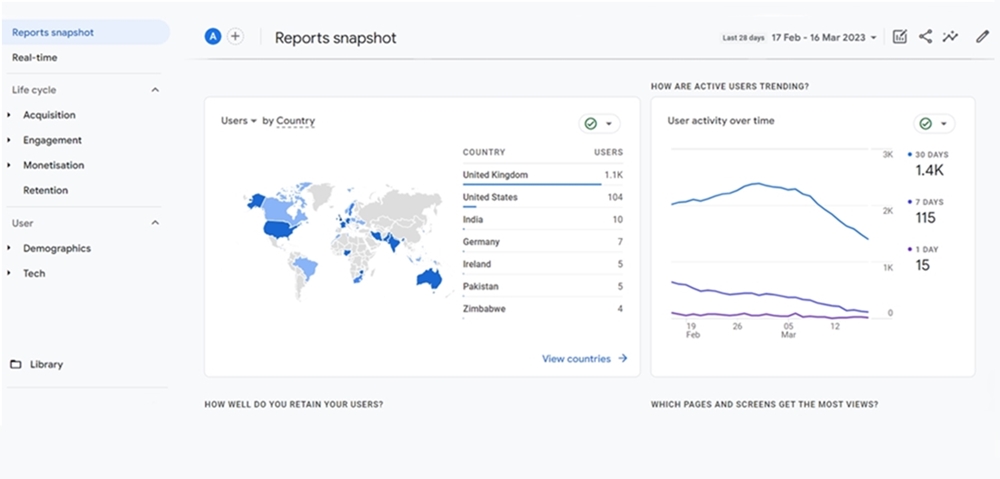
As technology continues to evolve, so does the world of digital marketing. Google Analytics has been a staple tool for marketers since its launch in 2005, and it has undergone significant changes over the years. In October 2020, Google introduced its latest version, Google Analytics 4 (G4), which replaces the previous version, Universal Analytics. In this article, marketing experts Protean Inbound explore the differences between the two and why it’s essential for marketers to upgrade to G4.
What is Google Analytics 4?
Google Analytics G4 is the latest version of Google Analytics that provides businesses with valuable insights into their website and app performance. It was designed to help marketers better understand customer behaviour, preferences, and the customer journey across various platforms.
How is it different from Universal Analytics?
Google Analytics G4 differs from Universal Analytics in several ways. Firstly, it uses machine learning to help businesses gain deeper insights into customers’ behaviour. It provides more extensive data coverage and tracks events such as scroll, video engagement, and file downloads without the need for additional coding. It also allows businesses to analyse data from multiple platforms, including iOS and Android apps, YouTube, and more.
Another significant difference is the way it handles user tracking. Unlike Universal Analytics, G4 uses an event-driven data model that tracks user interactions, including clicks, pageviews, and other custom events. This means that businesses can create custom events to track specific user behaviour, making it easier to analyse across multiple channels and platforms.
Why is it essential for marketers to upgrade to 4?
On July 1, 2023, standard Universal Analytics properties will stop processing data. Hence, Google strongly encourages all users to make the switch to Google Analytics 4 as soon as possible.
After July 1, 2023, you’ll be able to access your previously processed data in your Universal Analytics property for at least six months, and Google encourages everyone to export their historical reports during this time.
Google Analytics 4 offers several benefits for marketers. Firstly, it provides a more comprehensive view of customer behaviour, including data from mobile apps and cross-device tracking. This means businesses can gain a better understanding of how their customers interact with their brand across multiple platforms, allowing them to create more effective marketing campaigns.
Another reason why upgrading to G4 is essential is that it provides better privacy controls. With the introduction of GDPR and CCPA, data privacy has become a significant concern for businesses. Google Analytics G4 is designed to help businesses comply with these regulations by providing better data controls and user consent management.
Finally, upgrading to G4 ensures that businesses can take advantage of the latest features and capabilities. As Google continues to update its analytics platform, businesses that stick with outdated versions may miss out on valuable insights and optimisation opportunities.
A Beginners Guide To Using Google Analytics 4
With its new interface, features, and capabilities, it can be overwhelming for beginners to navigate. The following short guide is designed to provide a step-by-step introduction, from setting up your account and adding a data stream to using the new reports and machine learning features. Whether you’re new to web analytics or are a seasoned professional, this guide will help you get the most out of Google Analytics 4.
- Setting up your Google Analytics 4 account: If you haven’t already, you will need to create a new Google Analytics 4 account. Follow the prompts to set up your account, add your website details, and accept the terms of service.
- Understanding the new interface: Google Analytics 4 has a new interface that is different from the previous version. Spend some time familiarising yourself with the new interface and how to navigate it.
- Adding a data stream: You will need to add a data stream to begin tracking data for your website. Click on “Data Streams” from the left-hand menu, and then click “Add Stream.” Follow the prompts to add a data stream for your website.
- Installing the tracking code: Once you have added a data stream, you will need to install the tracking code on your website. Click on “Tagging” from the left-hand menu and then follow the prompts to generate the tracking code. Copy the code and paste it into the header of your website.
- Setting up your goals: Setting up goals will help you track the success of your website. Click on “Goals” from the left-hand menu, and then click “Create Goal.” Follow the prompts to set up your goals.
- Using the Analysis Hub: The Analysis Hub is a new feature in Google Analytics 4 that provides a more detailed analysis of your website’s data. Click on “Analysis” from the left-hand menu, and then click “Analysis Hub.” Here you can create custom reports, analyse your website’s data, and gain insights into your website’s performance.
- Using the new reports: Google Analytics 4 includes several new reports that were not available in the previous version. Spend some time exploring the new reports and understanding the data they provide.
- Creating custom reports: If the standard reports in Google Analytics 4 do not provide the information you need, you can create custom reports. Click on “Customisation” from the left-hand menu, and then click “Custom Reports.” Follow the prompts to create a custom report.
- Using machine learning: Google Analytics 4 includes machine learning capabilities that can help you gain insights into your website’s data. Click on “Intelligence” from the left-hand menu to access these features.
- Learning more: Google Analytics 4 is a powerful tool, and there is much more to learn. Spend some time exploring the help center and other resources to learn more about how to use Google Analytics 4 to optimise your website’s performance.